I’m often struck by how even the most straightforward and standard interfaces are cumbersome to get right. I know, I know, I’m the first to admit I don’t get stuff right all that often, especially not at the first go, but hear me out. Imagine the following object:
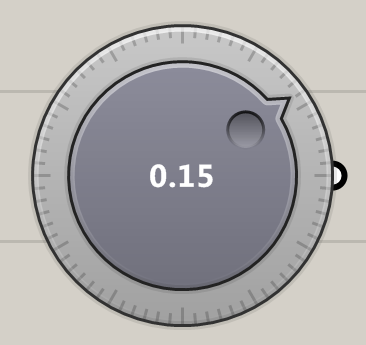
It’s something which is used often in hardware control panels, but less often in software UI. Most notably, when it is used in software it’s mostly when the software is specifically designed to mimic hardware, such as audio mixing boards. This is actually a shame, because a dial provides a number of benefits over linear sliders. For one, it is potentially infinite. You can keep turning it and turning it all the while changing the value. This is not possible with a linear slider. Also, the farther away the mouse is from the dial, the more accurate the control becomes, as the angle between two adjacent pixels is much smaller from the dial’s point of view:
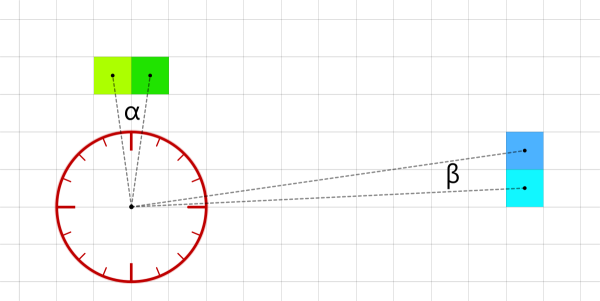
The angle α is larger than β because the green pixels are closer to the dial than the blue pixels. So as users we can adjust how much effect a radial mouse displacement has simply by moving the cursor towards or away from the dial. Although one could implement a similar effect in linear sliders (the further away the mouse from the slider, the less the effect of a mouse translation), it would not be anywhere near as intuitive and controllable as the native behaviour of the dial.
But I came here to complain about boring interfaces, and a tuning dial is not boring, even though you might feel it is annoying. The boring bit comes in when we need to make the dial behaviour customizable. Is the value limited to some domain? If yes, what is this domain? What is the range of a single full turn? And so on and so forth. Simply putting all these values on a window would certainly allow users to adjust the dial and I’d bet a lot of programs simply take this approach and leave it at that.
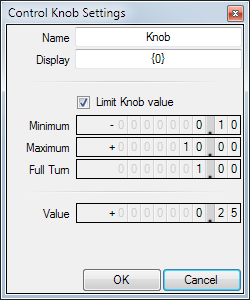
But there’s a problem, some user settings depend on other user settings, which means not all possible values result in valid states, allow me to elaborate. The minimum limit should not be equal to or higher than the maximum limit and —conversely— the maximum limit should not be equal to or less than the minimum limit. How do we enforce this rule? Take some time to think about how you would encode this constraint.
Here are a few ‘solutions’ that immediately spring to mind, mostly because I’ve seen them used before or even used them myself in a dark and troubled past:
- Allow users to enter any values they want, but don’t allow them to OK the new settings if the values result in paradox.
- Allow users to enter any values they want, but repair paradoxical values on OK behind the scenes.
- Allow users to enter any values they want, but disable the dial when paradoxical values are assigned.
- Do not allow the user to enter an invalid value, thus, the Maximum is not allowed to become equal to or less than the Minimum. If you want it to go lower, you must first adjust the Minimum to ‘make room’.
I don’t like any of these. It should not be possible to get into paradoxical states in the first place, even as intermediates. Forcing people to repair them is akin to bullying in my opinion. Even when it is abundantly clear which values are invalid and why, it still feels as though the software is badgering the user for entering invalid values. It’s also a bad idea to ‘fix’ paradoxical values upon OK, because you may well adjust a value that wasn’t supposed to be adjusted. If, on OK, we ensure that Maximum is larger than Minimum, it means we potentially change a value the user specifically set. This is not polite. Solution #4 is bad because it makes you think about the order in which you need to adjust the values, which may well be different from the mental picture users have.
I don’t really have a good answer on how to solve this, my favourite approach definitely doesn’t feel like it’s perfect. At the moment, I’ve encoded the following rules into this window:
- When the Minimum is being adjusted upwards by the user, then automatically increase the Maximum to ensure it remains larger than Minimum.
- When the Minimum is being adjusted downwards by the user, then try to reinstate the original Maximum as best you can.
- When the Maximum is being adjusted downwards by the user, then automatically decrease the Minimum to ensure it remains smaller than Maximum.
- When the Maximum is being adjusted upwards by the user, then try to reinstate the original Minimum as best you can.
- When the Limit checkbox becomes checked, then adjust the Value to be within the Minimum/Maximum domain.
- When the Limit checkbox becomes unchecked, then reinstate the original Value.
- When the Limit checkbox is checked and the Minimum/Maximum are changed, then try to reinstate the original Value as best you can.
- When the Value is adjusted, do not allow it to go outside of the Minimum/Maximum range if the Limit is checked (note that the user is thus not allowed to enter any value she wants in this special case).
Basically, this all involves double book-keeping. One has to remember all the values that the user entered herself —these values must be considered sacred by the program— while at the same time adjusting them to avoid paradox. Which values get precedence depends on which values get modified.
Even standard interface design can be nightmarish to get right…


 Bugs for breakfast
Leave a reply to jsdbroughton Cancel reply